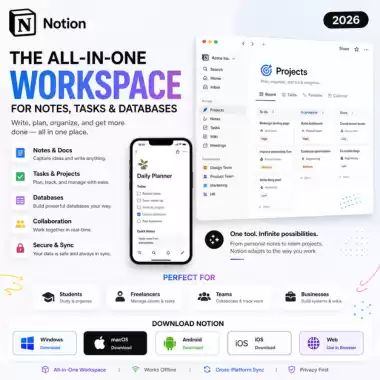
Notion — The All-In-One Workspace for Notes, Tasks & Databases (2026)
Are you tired of switching between different apps for notes, to-do lists, and project management? Notion is a revolutionary workspace that combines all these tools into one. Whether you are a student, a freelancer, or part of a large team, Notion helps you organize your life and work with ease. Below is the verified guide for the latest 2026 version.
Important Safety & Usage Note
Notion is a cloud-based service available for free for personal use. Always download the desktop and mobile apps from the official Notion website or verified app stores. Avoid "pre-activated" or "cracked" desktop versions from untrusted sources, as they can compromise your private data and notes. Always use a strong password and enable 2FA.
Why Use Notion?
- Versatile Blocks: Build your pages using text, images, checklists, and even code snippets.
- Powerful Databases: Organize information using tables, kanban boards, calendars, and galleries.
- Templates: Start instantly with thousands of free templates for everything from habit tracking to project planning.
- Seamless Sync: Your data stays updated across Windows, Mac, iOS, and Android devices.
- Collaboration: Share pages with friends or colleagues and work together in real-time.
Safety & Trust Checklist
- ✅ Official Notion Developer links provided.
- ✅ Cloud-based security with encrypted data storage.
- ✅ Safe for personal and professional documentation.
- ✅ Regular updates and a clean, ad-free experience.
🖥️ Download Notion for Desktop
📱 Get Notion for Mobile (Android)
Software Details & System Requirements
| Software | Notion (Latest 2026 Version) |
| Category | Productivity / Note-Taking |
| Platforms | Web, Windows, macOS, Android, iOS |
| Cost | Free Personal Plan (Pro Plans available) |
How to Get Started (Quick Guide)
- Visit the official link above and sign up with your email.
- Download the desktop app for a faster, dedicated experience.
- Create your first page by clicking the "+ Add a page" button.
- Type "/" to see the list of commands (headers, lists, tables, etc.).
- Use a Template from the sidebar to see what's possible.
Pros & Cons
Pros
- Extremely flexible and customizable to your needs.
- Replaces multiple apps (Evernote, Trello, Google Docs).
- Beautiful, clean, and minimalist interface.
Cons
- Can have a slight learning curve for advanced features.
- Offline mode is limited compared to some other note apps.
Top Alternatives
- Obsidian — Best for local, private, and markdown-based notes.
- Microsoft OneNote — Excellent for digital handwriting and freeform notes.
- Evernote — A classic choice for quick web clipping and simple notes.
FAQ
- Q: Is Notion free for students? A: Yes! Notion offers a free Plus plan for students and educators with a valid school email.
- Q: Can I use Notion offline? A: You can edit pages you already have open, but Notion is primarily designed for online use.
Final Note
Notion is the ultimate tool to declutter your digital life. Use it to build your "second brain" and keep all your information in one place. Follow the safety checklist and start organizing today!